
Shopify Sidekick AI Analytics for Wishlist, Inventory & Customer Insights
Shopify Sidekick AI Analytics for Wishlist, Inventory & Customer Insights
Use Shopify Sidekick with WC Wishlist & Back in Stock to ask plain-language questions about shopper interest, restock demand, campaign results, and customer behavior—right inside Shopify Admin.
Instead of exporting data or piecing together reports from multiple screens, you can ask Sidekick questions like Which products were wishlisted the most this week? or Which out-of-stock items have the highest restock demand? and get answers based on your wishlist and back-in-stock activity.
What you can learn with Sidekick
- High-intent products: See which products customers are saving most often.
- Restock demand: Find out which out-of-stock products have the most back-in-stock requests.
- Customer value: Identify shoppers with strong purchase or wishlist intent.
- Campaign impact: Understand how your back-in-stock emails and customer outreach perform.
- Trend shifts: Spot products gaining attention before sales numbers catch up.
How it works
When you ask a question in Sidekick, Shopify interprets your prompt and returns a response using the wishlist and back-in-stock data available through WC Wishlist & Back in Stock.
Show my most wishlisted products from the last 30 days or Which products have the most back-in-stock signups right now?.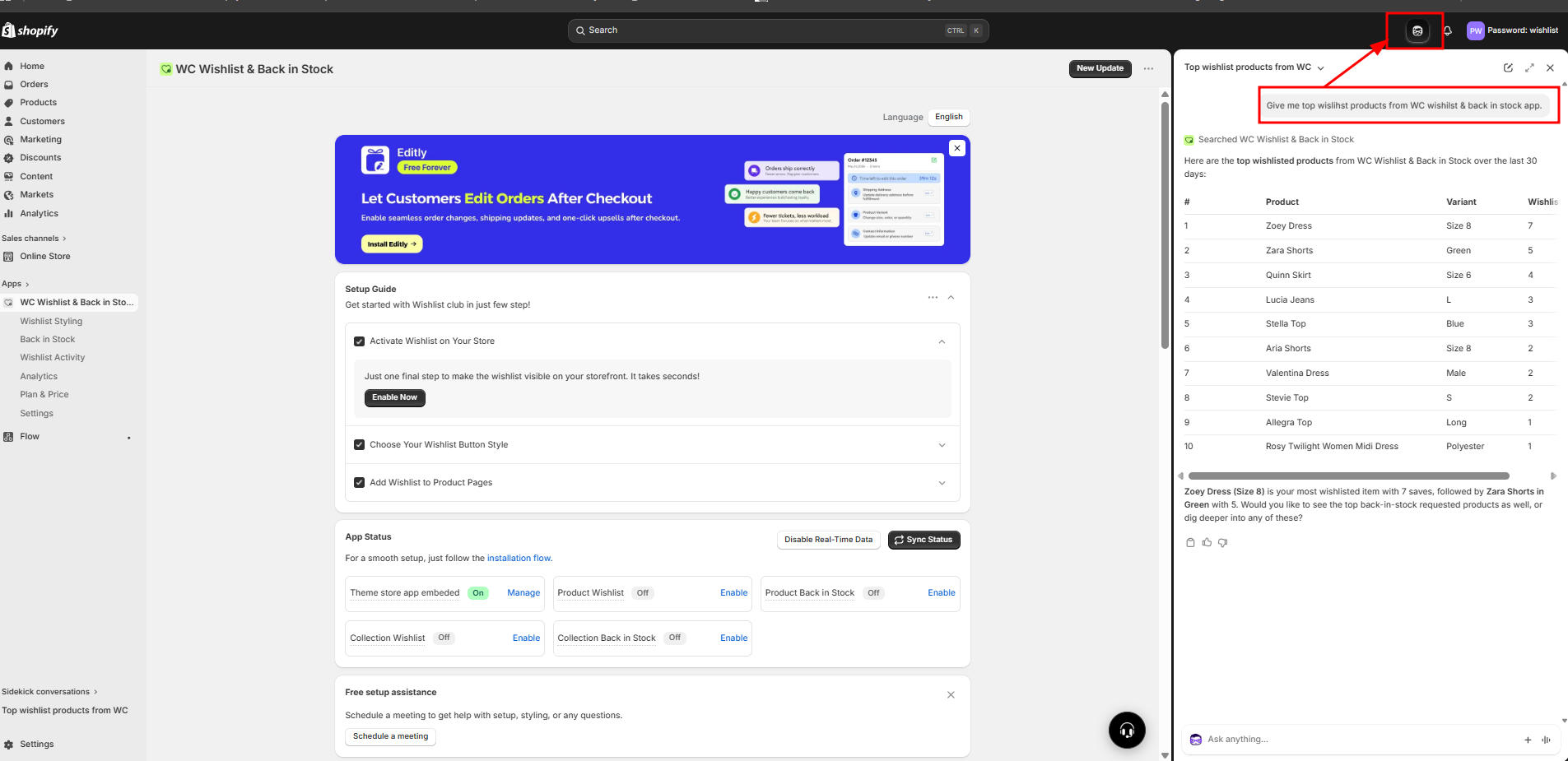
Best ways to use Sidekick with WC Wishlist & Back in Stock
1. Prioritize what to restock
Use Sidekick to identify products with both high wishlist activity and strong back-in-stock demand. This helps you focus replenishment on items customers are actively waiting for—not just products that sold well in the past.
Try asking:
Which out-of-stock products have the most back-in-stock requests?Show me products with high wishlist activity and low inventory.What are the top requested restocks in the last 14 days?
2. Decide what to feature in marketing
Wishlist activity can reveal demand before purchases happen. Use it to choose products for homepage features, email campaigns, paid ads, and social promotions.
Try asking:
Which products were wishlisted the most this month?What product categories are getting the most wishlist saves?Which new arrivals are gaining wishlist interest fastest?
3. Measure campaign performance
If you run back-in-stock alerts or customer outreach campaigns, Sidekick can help you quickly understand which products and audiences are responding best.
Try asking:
Which back-in-stock alerts led to the most engagement?What products performed best after a restock email was sent?Which restocked items had the strongest customer response?
4. Spot high-intent shoppers
Customers who save products or request restock alerts often show stronger buying intent. Use Sidekick to identify these patterns and improve follow-up timing.
Try asking:
Which customers have the most wishlist activity?Show customers who requested restock alerts for multiple products.Which shoppers are showing repeated interest in the same product category?
5. Catch trends earlier
Wishlist and restock activity can signal rising demand before orders increase. This gives you a head start on merchandising, purchasing, and campaign planning.
Try asking:
Which products are gaining wishlist activity fastest this week?What products had a spike in back-in-stock requests recently?Show emerging product interest before sales peak.
Questions that work best
Sidekick usually gives the best answers when your question includes one or more of these details:
- Time range: today, last 7 days, last 30 days, this quarter
- Product scope: a collection, category, vendor, or product type
- Customer scope: new customers, repeat buyers, VIPs, or a region
- Goal: restocking, promotion planning, trend spotting, or campaign review
Better prompt examples:
Which dresses were wishlisted the most in the last 30 days?Which sold-out products have the highest back-in-stock demand this week?What products are trending up in wishlist saves compared with last month?
Practical workflows
Use wishlist demand to plan inventory
- Ask which products are most wishlisted over a recent time period.
- Compare those products with current inventory levels.
- Review which of them also have back-in-stock signups.
- Prioritize items with both strong shopper interest and low stock.
Use restock demand to plan promotions
- Ask which out-of-stock items have the highest signups.
- Review whether those products are being replenished soon.
- Prepare email, collection, or homepage placement for those products.
- After the restock, ask which products had the strongest response.
Use customer signals to improve targeting
- Ask which customers or segments show the strongest wishlist behavior.
- Identify product categories those shoppers save most often.
- Use those insights to refine offers, recommendations, or timing.
Best practices
- Ask one clear question at a time.
- Use recent date ranges when you want fast-changing demand signals.
- Compare wishlist activity with back-in-stock requests to validate intent.
- Use Sidekick regularly so you can notice changes in trend, not just one-time spikes.
- Follow up broad questions with narrower ones to get more actionable answers.
most wishlisted products, then narrow to out-of-stock, low inventory, or a specific collection. This usually turns a general insight into an action plan.Limitations to keep in mind
- Sidekick answers depend on the data available in Shopify and WC Wishlist & Back in Stock.
- Very new activity may not always be the best source for long-term trend decisions.
- Broad questions can miss important context, especially if your catalog is large.
Summary
Shopify Sidekick gives you a faster way to explore wishlist and back-in-stock activity without building reports manually. With the right questions, you can uncover which products shoppers want most, where restock demand is building, and how customer interest is changing—so you can make smarter merchandising, inventory, and marketing decisions directly from Shopify Admin.