
User Wishlist — view and manage individual customer wishlists
Overview
User Wishlist gives you a customer-by-customer view of wishlist activity. Instead of looking at overall wishlist totals, this tab shows who is saving products, how many items they have saved, and how recently they interacted with their wishlist.
Use this page to identify high-intent shoppers, understand individual buying interest, and quickly review a specific customer's saved products when planning marketing campaigns or assisting with support.
The User Wishlist tab combines wishlist activity into a simple customer list, making it easier to spot engaged shoppers and follow up based on real product interest.
What you'll see
Each row represents one wishlist owner. Depending on how the wishlist was created, the row may belong to a logged-in customer or a guest visitor.
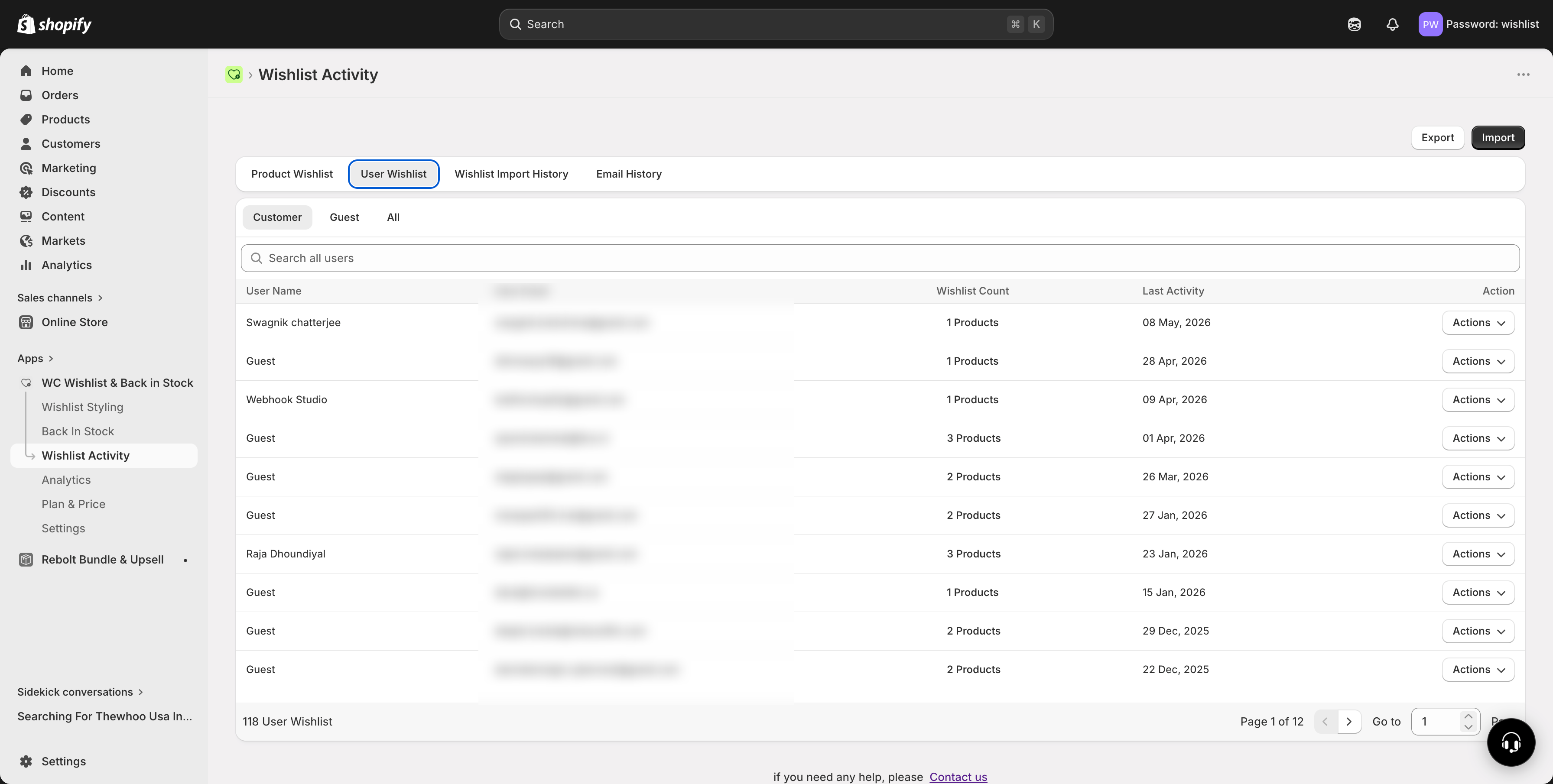
Columns in the User Wishlist table
User Name — The customer's name, or
Guestif the visitor was not logged in.User Email — The customer's email address when available. This is typically available for logged-in customers only.
Wishlist Count — The total number of products currently saved in that user's wishlist.
Last Activity — The date of the most recent wishlist action, such as adding or updating saved items.
Actions — Options to open the user's wishlist and review their saved products.
Guest wishlists usually contain less customer information because they are tied to browser activity rather than a signed-in customer account.
Filter by customer type
You can narrow the list to focus on the type of shopper you want to review.
Customer
Shows shoppers who were logged in when they used the wishlist. These records are the most actionable because they usually include a name and email address.
Best for targeted email campaigns
Useful for customer support follow-up
Helpful when identifying repeat or high-intent shoppers
Guest
Shows anonymous visitors who used the wishlist without logging in. These records still help you understand product interest, but they usually cannot be used for direct outreach unless identifying details were captured elsewhere.
Best for understanding browsing interest
Useful for measuring wishlist engagement beyond logged-in users
Helpful for spotting popular products among anonymous visitors
All
Shows both logged-in customers and guests in one combined view.
Best for a full picture of wishlist activity
Useful when reviewing total engagement trends
What you can do from the Actions menu
Use the Actions menu beside a customer to review their saved items and better understand their purchase intent.
View wishlist — Open the customer's saved products and see exactly what they are interested in.
Review saved items — Check product names, images, and wishlist composition to understand what types of products they are considering.
Support customers more effectively — Use wishlist details when answering questions, helping with product selection, or reviewing buying intent.
When a customer contacts your team asking about products they were considering, opening their wishlist can give quick context and speed up support.
How to use the User Wishlist tab
Navigate to Apps → WC Wishlist & Back in Stock → Wishlist Activity → User Wishlist.
Filter the table by Customer, Guest, or All depending on whether you want identifiable shoppers, anonymous visitors, or the full list.
Look at Wishlist Count and Last Activity together. Customers with larger wishlists and recent activity are often your strongest purchase-intent audience.
Use the Actions menu to view the products they saved and understand what they are considering.
Use what you learn to plan remarketing campaigns, prioritize support outreach, or identify which products generate the most customer interest.
Best ways to use this data
Find high-intent shoppers
Customers with a high Wishlist Count and a recent Last Activity date are often closer to making a purchase. These shoppers are strong candidates for follow-up promotions, reminders, or personalized campaigns.
Prioritize marketing outreach
Focus first on logged-in customers because they are identifiable and easier to reach. Their wishlist activity can help you create more relevant campaigns based on the products they actually saved.
Spot product interest trends
If you notice many users building wishlists around similar products or categories, that can help guide merchandising, promotions, or seasonal planning.
Support customers with context
If a customer asks about items they were considering, their wishlist helps your team quickly understand what they were interested in without asking them to start over.
How to identify your best opportunities
Look for customers with many saved items — this usually signals strong product interest.
Prioritize users with recent activity — fresh activity often indicates active shopping behavior.
Start with logged-in customers when planning outreach — these records are more actionable.
Review guest activity to understand overall demand even when direct contact is not possible.
A customer with several saved products and recent activity is often a better campaign target than a customer with an older, inactive wishlist.
Things to keep in mind
Guest users may appear without a name or email address.
Wishlist activity shows buying interest, but it does not guarantee a purchase.
Older wishlists may be less relevant than recently updated ones.
Logged-in customer records are generally the most useful for direct follow-up.
Do not assume guest wishlist records can be used for direct marketing unless you have collected contact details through another approved method.
Frequently asked questions
Customer records belong to shoppers who were logged in when they used the wishlist. Guest records belong to anonymous visitors who used the wishlist without signing in.
If the wishlist belongs to a guest visitor, identifying details such as name and email may not be available. This is expected behavior for anonymous usage.
Last Activity is the most recent date that user interacted with their wishlist, such as adding or updating saved products.
Start with users who have both a high Wishlist Count and a recent Last Activity. If you are running campaigns, logged-in customers are usually the most effective audience because they are identifiable.
Need more help?
If you need help getting the wishlist button to appear correctly, contact our team:
Email: [email protected]
Live chat: available from the app admin
Onboarding: book a free 1:1 onboarding call