
Product Wishlist — see which products customers are saving most
Overview
The Product Wishlist tab shows which products customers are saving most often across your store. It gives you a clear, product-by-product view of customer interest, ranked by total wishlist saves.
Use this page to spot high-demand products early, prioritize restocks, and decide which items deserve more visibility in your marketing.
Products are ranked by how many times they have been added to wishlists, from highest to lowest.
How to access
Go to Apps → WC Wishlist & Back in Stock → Wishlist Activity → Product Wishlist.
What you’ll see
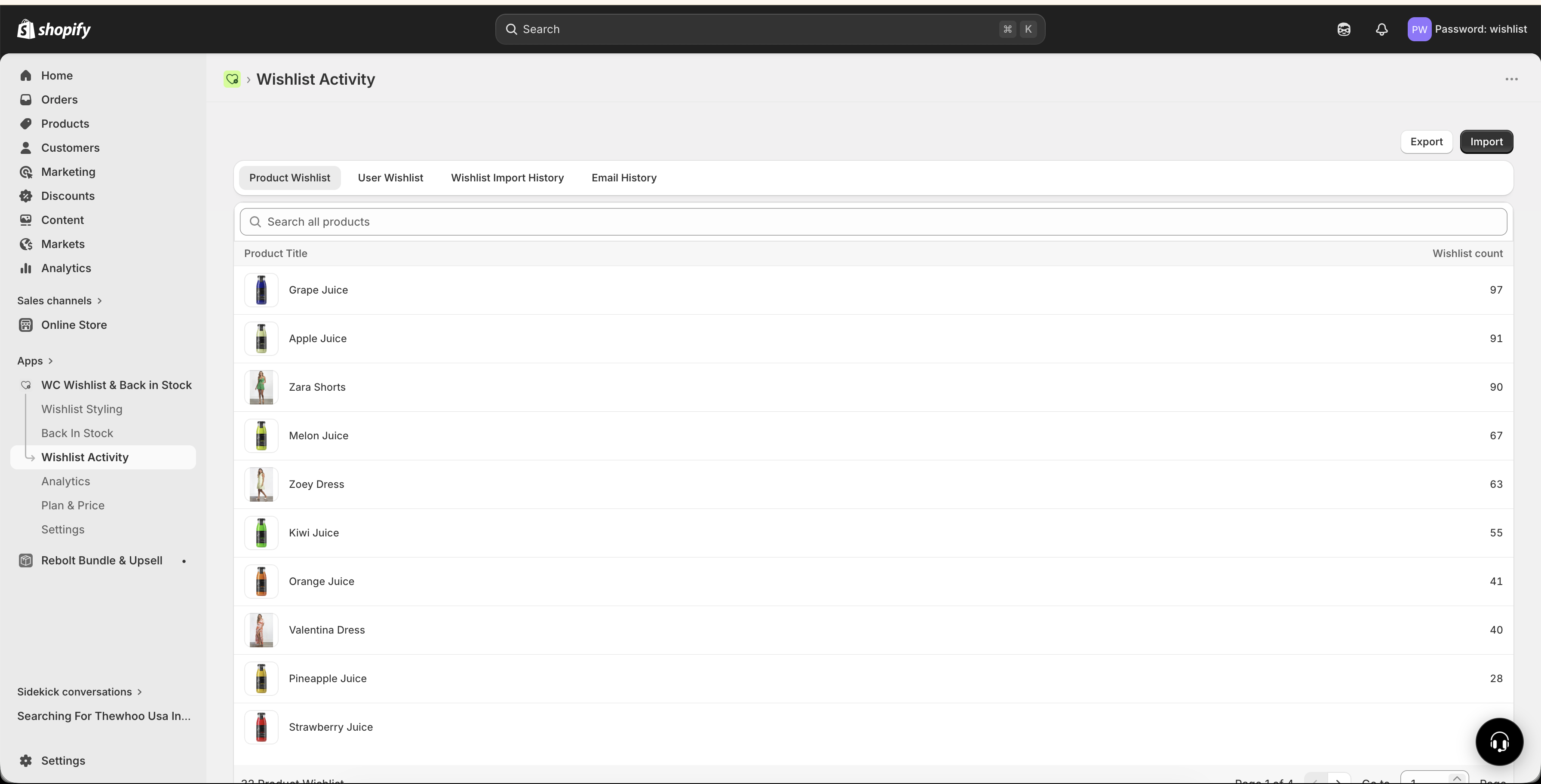
The Product Wishlist tab lists every product that has been added to at least one customer wishlist.
Product image and title — quickly identify the item
Wishlist count — see how many times the product has been saved
Ranked list — products appear from most wishlisted to least wishlisted
Each row gives you an immediate demand signal for that product. A high wishlist count usually means strong customer intent, even if the product has not sold in large numbers yet.
This view focuses on wishlist activity, not purchases. A product can have strong demand here even if recent sales are low.
Search and navigation
Use the search bar to find a product by name
Use pagination to move through large product lists
The list updates as customers add or remove products from their wishlists
This makes it easy to check a single product or review demand across your full catalog.
Why this report matters
Wishlist activity is one of the clearest signals of customer interest because it reflects deliberate intent. A customer who saves a product is usually more interested than someone who only viewed the page.
Page views show curiosity
Wishlist saves show stronger buying intent
That makes this report especially useful for merchandising, restock planning, and promotions.
How to use product wishlist data
Identify high-intent products
Products with high wishlist counts are products customers care about enough to save for later. These are often your best candidates for more visibility, faster restocks, or promotional support.
Prioritize restocks
If an out-of-stock product has been saved many times, you already have proof of demand. Restocking those items first can help you recover missed sales faster.
If a product is out of stock and has a high wishlist count, treat it as a priority restock item. Once it is available again, your back-in-stock flows can help convert that demand.
Plan targeted promotions
Your most wishlisted products are strong choices for:
Flash sales
Price-drop campaigns
Featured collection spots
Email campaigns
Social promotions
These products already have an interested audience, so they often perform better than randomly chosen promotional items.
Improve merchandising
Use your top-saved products in places where demand matters most:
Homepage “Most Loved” or “Customer Favorites” sections
Collection pages for trending products
Featured product blocks in email campaigns
Paid ads and retargeting campaigns
Spot missed opportunities
If a product has many wishlist saves but weak sales, it may signal a conversion issue rather than low demand. Common reasons include:
Price is too high
The item is out of stock
Shipping costs are discouraging checkout
Product photos or descriptions are not strong enough
Variant availability is limited
This makes the report useful not only for identifying winners, but also for finding products that need attention.
Best ways to act on this report
Start with the products at the top of the list. These are the items with the strongest wishlist demand.
Compare high wishlist counts against current inventory. If a popular product is low or out of stock, move it up your restock list.
If customers are saving a product but not buying it, review pricing, product content, shipping, and variant availability.
Feature your most wishlisted items in campaigns, homepage sections, and ads to turn saved interest into sales.
Check this report often to catch demand shifts early, especially during launches, seasonal campaigns, and restocks.
Examples of smart use cases
Before reordering inventory: check which out-of-stock or low-stock products have the highest wishlist counts
Before sending a marketing campaign: choose products customers are already saving
After launching new products: track which launches are generating real interest
During seasonal peaks: identify trending items before they sell out
How to interpret wishlist counts
A higher wishlist count usually means stronger interest, but context matters. Use wishlist data together with product availability, pricing, and seasonality.
This usually means the product is performing well and should stay highly visible in your store and campaigns.
This often points to friction such as stock issues, price sensitivity, or weak conversion on the product page.
This may mean lower customer interest, or simply that the product has had less visibility. Consider where and how often it is being shown.
Best practices
Review your top wishlisted products weekly
Pay close attention to out-of-stock items with high save counts
Use wishlist leaders in promotions before choosing products at random
Compare wishlist demand with sales to spot conversion issues
Monitor newly launched products to see which ones gain traction fastest
Wishlist data is especially valuable for stores with large catalogs, frequent restocks, or seasonal demand shifts. It helps you focus on what customers are already telling you they want.
Use alerts to stay ahead of demand for popular products.