
Removed from Wishlist email notification
Overview
When a customer removes a product from their wishlist, it does not always mean they have lost interest. They may have removed it by accident, compared a few products, or planned to come back later. The Removed from Wishlist email helps you re-engage that shopper with a gentle reminder while the product is still fresh in mind.
When this notification is enabled, the app automatically sends an email after a customer removes an item from their wishlist. The email can show the product image, name, price, and quick links so the customer can view the product again or add it back with minimal effort.
A short delay usually works best. Sending this email too quickly can feel reactive, while waiting 10 to 60 minutes gives shoppers time to reconsider naturally.
What this email does
Sends automatically after a customer removes a product from their wishlist
Reminds the customer which item was removed
Helps recover purchase intent before interest fades
Lets the customer quickly return to the product page or add the item back
How to set it up
In Email Customization, select Removed from Wishlist from the list of available emails.
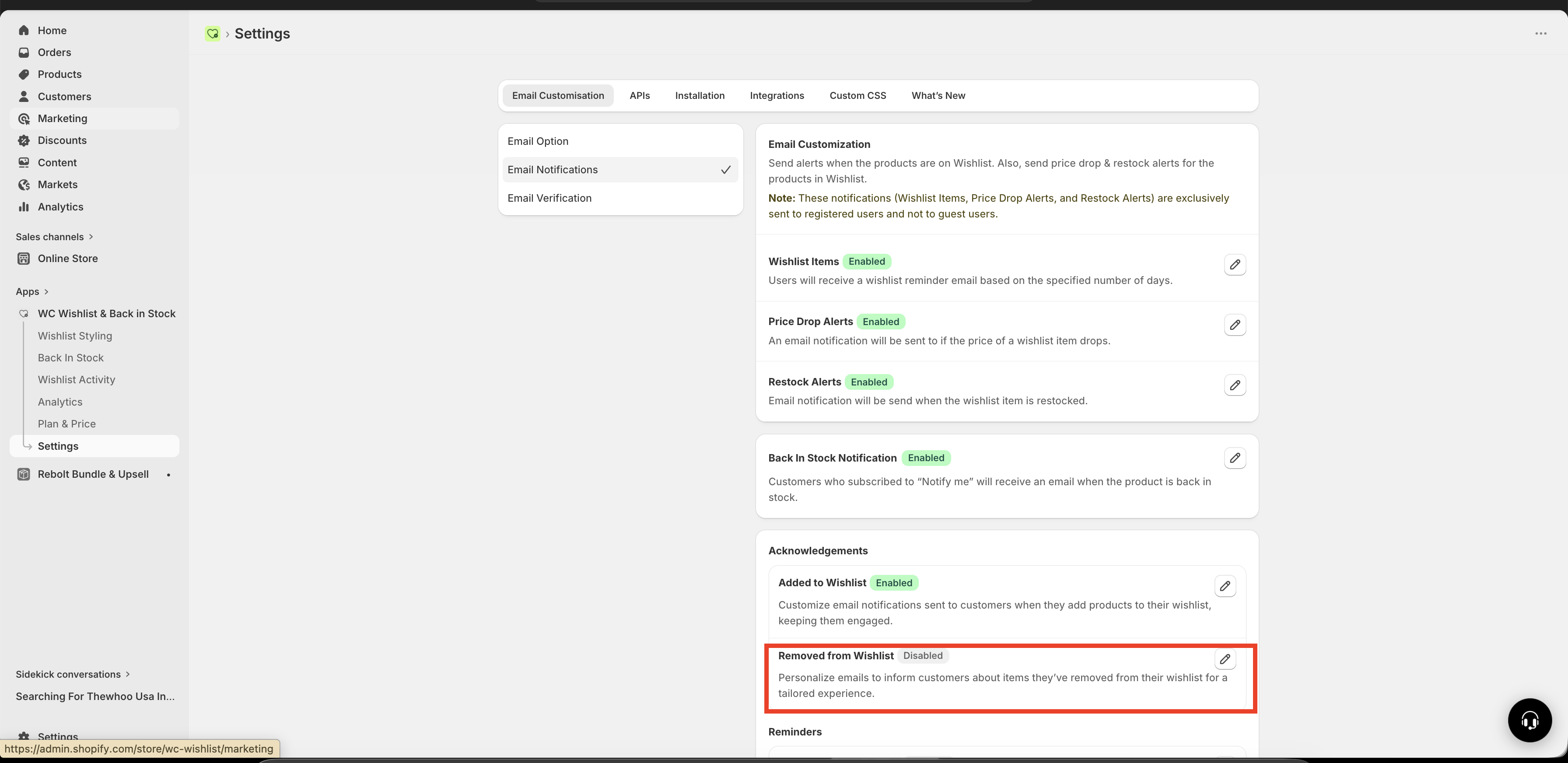
Turn on the email if you want it to send automatically when customers remove items from their wishlist.
Add a subject line that feels helpful and low-pressure. Keep it concise so customers immediately understand why they received the email.
Select how long the app should wait before sending the email after the item is removed.
Edit the email content to match your brand voice and include helpful product details and call-to-action links.
Review the content, then save so the updated version is used for future emails.
Settings
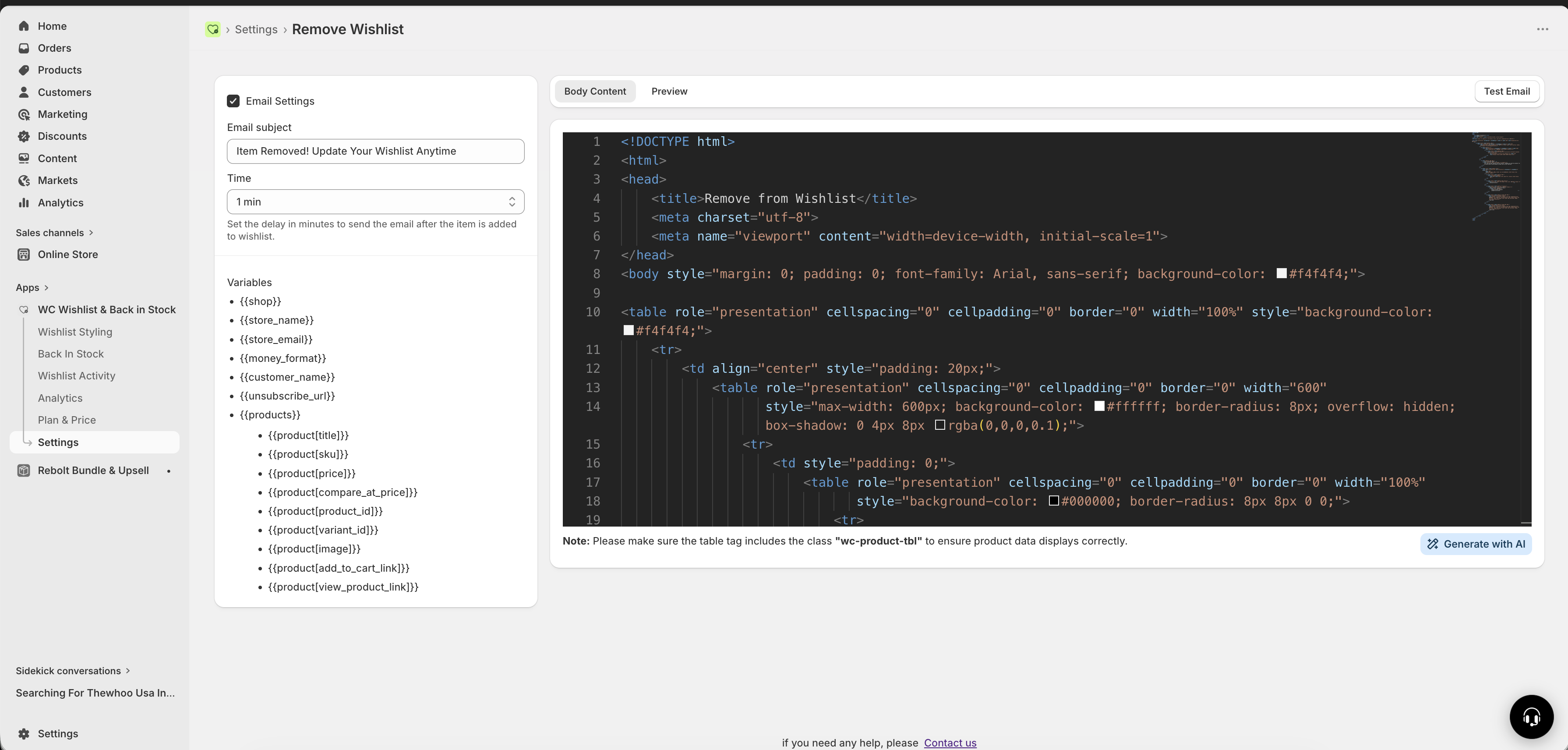
Enable / Disable
Use this toggle to turn the email automation on or off.
Enabled: the email is sent automatically after a customer removes a product from their wishlist
Disabled: no reminder email is sent
Email subject
Your subject line should sound helpful, not pushy. Good subject lines remind the customer what happened and invite them to revisit the product without pressure.
Example subject lines:
Item Removed! Update Your Wishlist AnytimeYour Wishlist Has Changed 🛍️Still Thinking About It? 👀Changed your mind? This item is still available
If your brand tone is more premium or minimal, avoid too many emojis and keep the subject line simple and direct.
Send delay timing
Choose how long the app should wait before sending the email after a product is removed.
Available options:
1 minute
10 minutes
1 hour
Best practice: use a delay of 10 minutes to 1 hour. This gives the customer space to continue browsing and makes the reminder feel more thoughtful.
Recommended email content
The most effective Removed from Wishlist emails are simple, friendly, and focused on helping the customer return to the product if they want to.
Include these elements:
A soft headline, such as
Changed your mind? No worries — it's still here.The product image
The product title
The current product price
A button or link to view the product again
A quick way to add the item back or go straight to checkout, if appropriate for your store
Your unsubscribe link
Keep the tone:
Helpful
Reassuring
Light and non-pushy
Consistent with your brand voice
Avoid using overly urgent or aggressive wording in this email. Since the customer just removed the item, a softer approach usually performs better than heavy discounting or pressure-based messaging.
Available email variables
You can personalize this email using the same store, customer, and product variables available in other notification emails. The most useful variables for this email are listed below.
Variable | What it inserts |
|---|---|
| The customer's name |
| The removed product name |
| The product image |
| The current product price |
| A link back to the product page |
| A direct add-to-cart link |
| The unsubscribe link |
Make sure the product table in your email template includes the class wc-product-tbl. Without it, product details may not render correctly in the email.
Template best practices
Use the HTML editor to create an email that feels like a helpful reminder rather than a sales push.
Recommended structure
Friendly opening
Short explanation that the item is still available
Product details block with image, title, and price
Primary action button to view the product
Optional secondary action to add it back
Clear unsubscribe link in the footer
Example messaging ideas
Headline:
Changed your mind?Supporting text:
No problem — the item you removed is still available if you'd like to take another look.Primary CTA:
View productSecondary CTA:
Add it back
When to use this email
This email works especially well if your store sells products that customers often compare before buying, such as:
Fashion and accessories
Home decor
Beauty products
Electronics and gadgets
Gift items
It is most useful when customers need a small nudge to revisit a product they were already considering.
Tips for better results
Use a calm, helpful tone instead of urgency-heavy copy
Keep the design clean so the product stands out
Send after a short delay rather than immediately
Make sure your main call to action is obvious
Use the customer name only if it feels natural in your brand voice
Review the product image and price formatting in the final template
This email is a recovery touchpoint, not a full promotion campaign. In most cases, a simple reminder performs better than a discount-heavy message.
Troubleshooting
Check that the Removed from Wishlist email is enabled and that your changes have been saved. Also confirm that the customer actually removed an item from their wishlist after the email was turned on.
Make sure your template includes the correct product variables and that the product table contains the class wc-product-tbl.
Use softer subject lines, reduce urgency-focused wording, and increase the send delay to 10 minutes or 1 hour.
Use one primary action, such as View product, and keep additional links secondary so customers know what to do next.
Need help?
If you are not sure which file to edit, or you would rather have us handle the installation, contact our support team:
Email: [email protected]
Live chat: available from the app admin
Free onboarding 1:1 call