
PushOwl & Brevo integration — web push and email automation
Overview
PushOwl & Brevo lets you use web push notifications and email automation together with Wishlist Club. This gives you two ways to bring shoppers back:
Web push notifications reach customers directly in their browser, even when they are no longer on your store.
Brevo email automation lets you send follow-up emails based on wishlist activity.
Together, these channels help you recover interest, remind shoppers about saved products, and drive more conversions from wishlist intent.
Web push notifications can reach shoppers without requiring an email address. Email automation through Brevo adds a second channel for customers who have subscribed or shared their email.
What this integration does
When the integration is connected, Wishlist Club sends wishlist activity to PushOwl & Brevo so you can automate customer messages from key shopping moments.
Send browser notifications for price drops, restocks, low stock, reminders, and more.
Send email automations in Brevo using the same wishlist events.
Build multi-channel journeys that combine push and email for better follow-up.
Re-engage high-intent shoppers based on products they already saved.
Supported wishlist triggers
Trigger | How you can use it |
|---|---|
Price Drop on Wishlist Item | Notify customers when the price of a saved product goes down. |
Wishlist Item Back in Stock | Alert customers as soon as a saved product is available again. |
Wishlist Item Low in Stock | Create urgency when a saved item has limited inventory remaining. |
Wishlist Reminder | Bring back shoppers who added products to a wishlist but have not returned. |
Abandonment Wishlist | Recover shoppers who showed interest but did not complete their purchase. |
Item Added to Wishlist | Send a confirmation or start a follow-up journey after a product is saved. |
Item Removed from Wishlist | Use removal activity as a signal for re-engagement or campaign segmentation. |
Before you start
Make sure Wishlist Club is installed and active on your store.
Make sure you have access to your PushOwl account.
If you plan to use email, make sure your Brevo setup is available from your PushOwl account.
Have your PushOwl Private API Key ready before saving the integration.
You need the correct PushOwl Private API Key for the integration to connect successfully. If you use the wrong key or an outdated key, wishlist events will not sync.
Set up the PushOwl & Brevo integration
In Shopify, go to Apps → WC Wishlist & Back in Stock → Settings → Integrations → PushOwl & Brevo: Email, Push.
Turn on the integration toggle for PushOwl & Brevo. This allows Wishlist Club to send supported wishlist events to your connected messaging tools.
Open your PushOwl account in a new tab and confirm you can access the account settings area.
In PushOwl, go to the Email section from the left sidebar. This opens the Brevo email settings in a new tab so you can manage your email setup alongside web push.
In PushOwl, go to Account → Settings → API Keys. Generate a new Private API Key if needed, or copy your existing one.
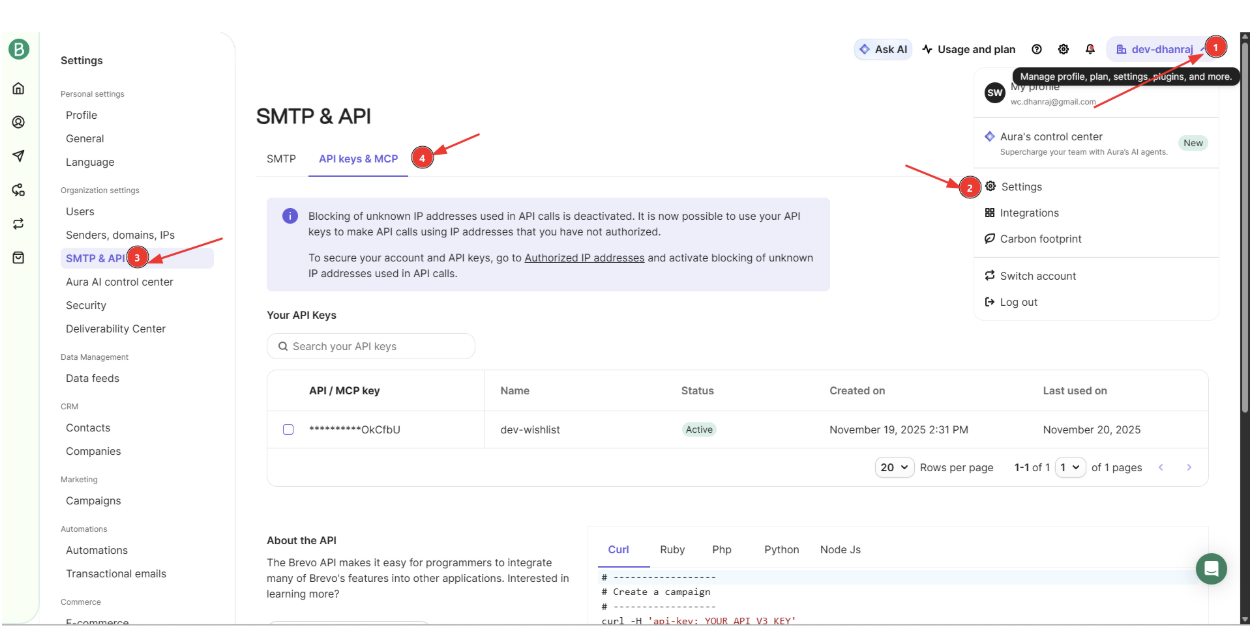
Return to the Wishlist Club integration page, paste the Private API Key into the API key field, and save your changes.
After saving, check that the integration remains enabled and review your automation tools in PushOwl & Brevo to confirm they are ready to use wishlist events.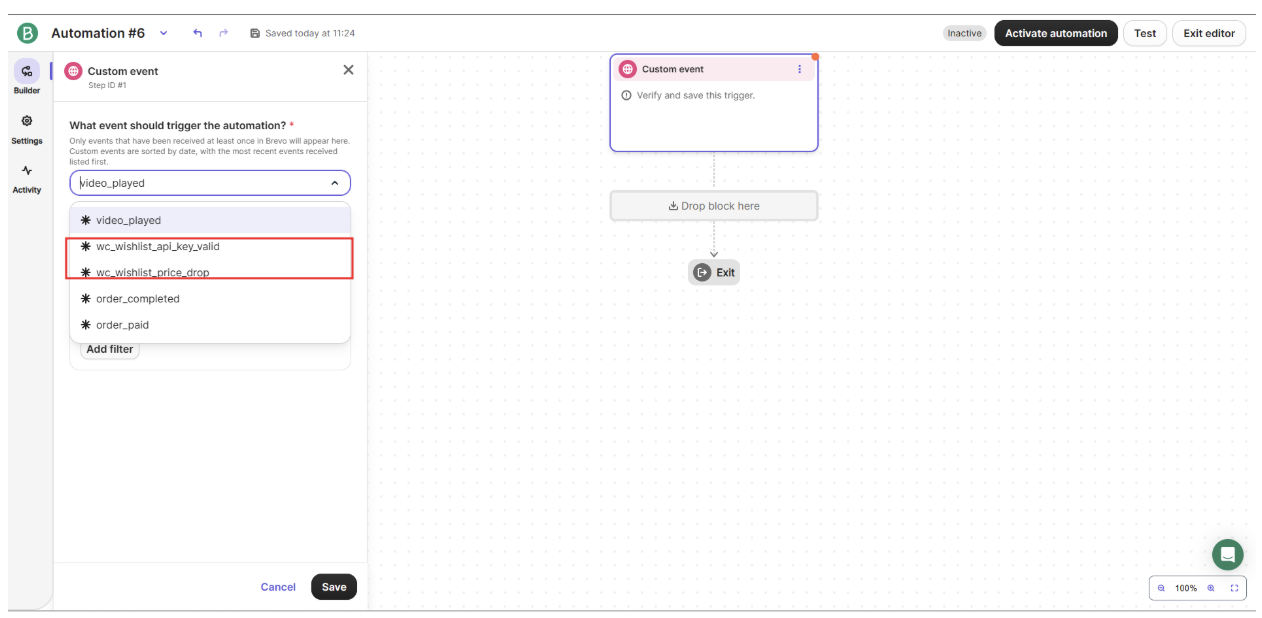
Recommended setup after connecting
After the connection is saved, set up your most important automations first:
Back in stock for saved products that return to inventory
Price drop for shoppers waiting for a better deal
Wishlist reminder for inactive customers who need a nudge
Low stock for urgency on popular wishlisted items
Start with Back in Stock and Price Drop automations first. These usually perform best because they match strong shopper intent and are tied to clear product changes.
Best practices
Use push for urgency. Push notifications work well for restocks, low stock, and price drops because they are immediate.
Use email for richer follow-up. Email is better for product details, recommendations, and longer reminder sequences.
Avoid over-messaging. If you use both push and email for the same trigger, space them out so customers do not receive duplicate messages at the same time.
Keep message content product-specific. Mention the saved item whenever possible so the message feels relevant.
Review your audience regularly. Remove inactive or unengaged contacts from repeated reminder flows where appropriate.
How shoppers experience this integration
Once connected, customers can receive timely follow-up messages based on the wishlist actions they take in your store. For example:
A shopper saves a product and later receives a reminder to come back.
A saved item goes out of stock and then returns, triggering a restock notification.
A product on the shopper’s wishlist drops in price, prompting a push alert or email.
A limited-stock warning encourages the shopper to buy before inventory runs out.
Troubleshooting
Check the following:
The PushOwl Private API Key was copied correctly.
The integration was saved after the key was added.
Your automations in PushOwl or Brevo are active and configured for the supported wishlist triggers.
The customer actually qualifies for the channel being used. For example, email requires an email address, while push requires browser notification permission.
In PushOwl, go to Account → Settings → API Keys. If no usable key appears, generate a new Private API Key and copy it into the Wishlist Club integration settings.
Push and email depend on different customer permissions and setup requirements. Confirm that your Brevo email configuration is active in PushOwl and that the customer has a valid email address available for email campaigns.
Review your automation timing and reduce overlap between push and email flows. A good approach is to send the push notification first for immediate action, then send email later if the shopper does not return.
Frequently asked questions
No. Web push notifications can reach customers through their browser after they have granted notification permission.
Yes. You can build multi-channel follow-up sequences using the same wishlist trigger, such as a push alert first and an email reminder later.
Back in stock, price drop, and wishlist reminder are the most common starting points because they are highly relevant and easy for customers to act on.
This integration is designed around Wishlist Club events, such as saved items, restocks, reminders, and related shopper actions tied to wishlisted products.
Need help?
If you are not sure which file to edit, or you would rather have us handle the installation, contact our support team:
Email: [email protected]
Live chat: available from the app admin
Free onboarding 1:1 call