
Customize confirmation messages after subscribing
Overview
After a customer submits the Notify Me form, the popup shows one of three confirmation messages based on what happens next. You can customize each message to match your brand voice, reduce confusion, and make the subscription process feel more trustworthy.
This is a small setting, but it has a big impact. Clear confirmation messages help customers understand whether they successfully joined the waitlist, whether they were already subscribed, and whether they still need to verify their email.
Well-written confirmation messages can improve customer confidence and reduce repeat submissions or support questions.
How to access confirmation messages
In your Shopify admin, go to Apps and open WC Wishlist & Back in Stock.
Select Back In Stock from the app menu.
Find and open Confirmation Message.
Update the text for each customer scenario, then save your changes.
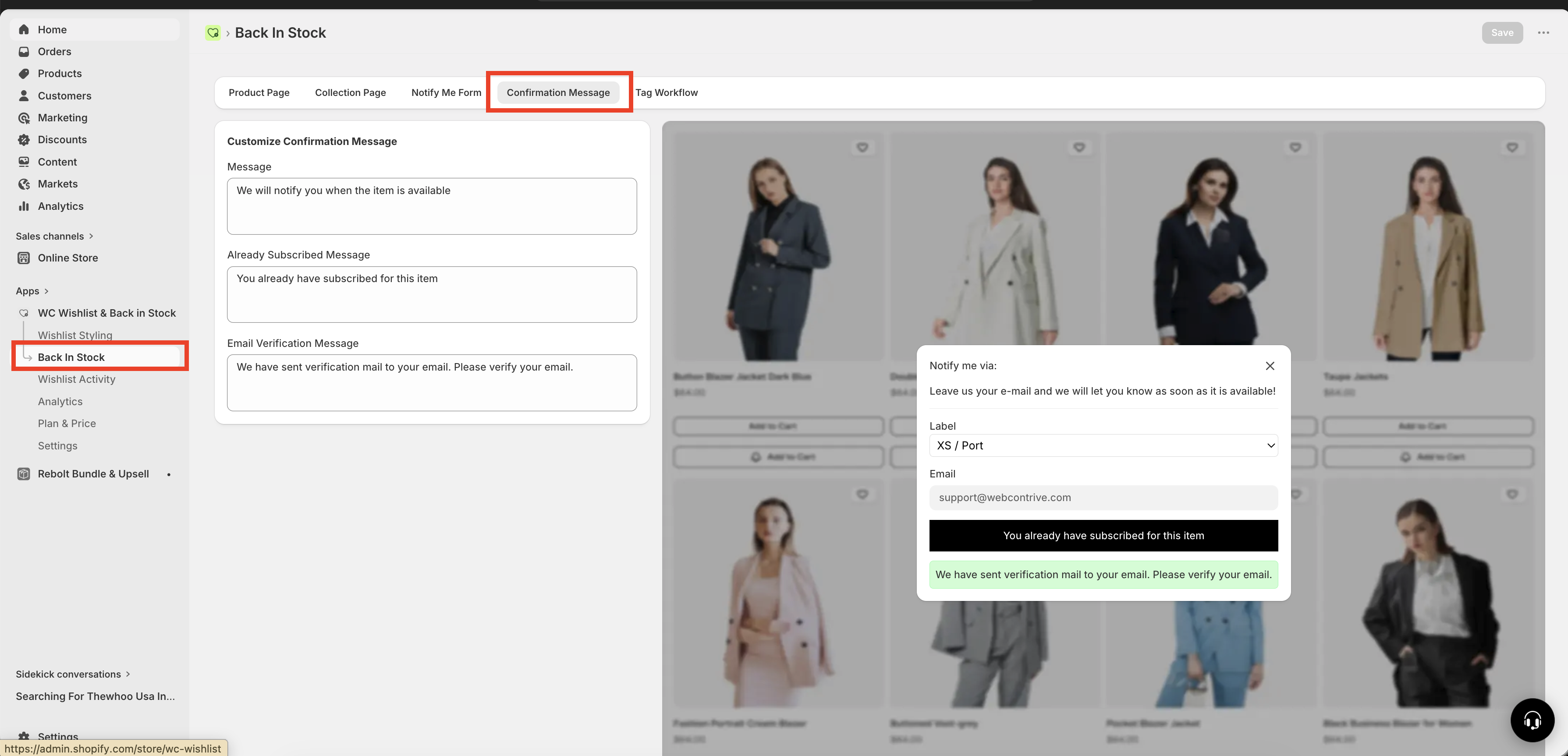
The 3 confirmation messages you can customize
Each message appears at a different moment in the customer journey. Make sure the wording matches what the customer needs to know right away.
1. Subscription success message
When customers see it: Immediately after they successfully submit the form for the first time.
Default message: We will notify you when the item is available
This is the main success message. Its job is to reassure the customer that their request was received and that they do not need to do anything else, unless your store requires email verification.
Best practices:
Confirm that the subscription worked.
Use simple, reassuring language.
Keep it short enough to read quickly in a popup.
If needed, mention what happens next.
Strong message examples:
You're on the list! We'll email you the moment it's back.Got it — we'll notify you as soon as this item is restocked.You're all set. We'll let you know when it's available again.
Messages that sound warm and confident usually perform better than messages that sound overly formal or robotic.
2. Already subscribed message
When customers see it: When they try to subscribe again for the same product or variant they already signed up for.
Default message: You already have subscribed for this item
This message prevents confusion. It lets the customer know their original subscription is still active, so they do not need to submit the form again.
Best practices:
Clearly confirm that they are already subscribed.
Reassure them that they will still receive the notification.
Avoid language that sounds like an error or warning.
Strong message examples:
You're already on the list for this item — we'll notify you when it's back.Good news — you're already subscribed. We'll email you when it's available.You already signed up for this item, and we'll let you know as soon as it's restocked.
This message is especially helpful for returning shoppers who may not remember whether they already subscribed.
3. Email verification message
When customers see it: After they submit the form and your setup sends them a verification email that requires action.
Default message: We have sent verification mail to your email. Please verify your email.
This is the most important message to get right if email verification is enabled. If customers do not understand that they must check their inbox and click the verification link, they may never complete the subscription.
Best practices:
Tell the customer that a verification email has been sent.
Explain that they must click the link in that email.
Use direct, action-focused language.
Keep the message clear enough to understand at a glance.
Strong message examples:
Almost done! We've sent you a verification email — click the link inside to confirm your subscription.Check your inbox! Please open the verification email and click the link to finish signing up.One more step: verify your email using the link we just sent so we can notify you when this item is back.
If this message is vague, customers may leave before verifying their email and will not receive restock notifications.
How to write better confirmation messages
If you want the best results, treat these messages as part of the customer experience rather than simple system text.
Be specific: Tell customers exactly what happened and what to expect next.
Be consistent: Match your brand tone across all three messages.
Be concise: Popups have limited space, so avoid long paragraphs.
Be reassuring: Customers want to know their request was successful.
Be action-oriented when needed: For verification messages, clearly explain what they need to do.
Recommended message set
If you want polished, customer-friendly wording you can use right away, start with this set:
Subscription success:
You're on the list! We'll email you as soon as this item is back in stock.Already subscribed:
You're already subscribed for this item — we'll notify you when it's available.Email verification:
Almost done! Please check your inbox and click the verification link to confirm your subscription.
If your brand voice is playful, premium, or highly minimalist, adjust the wording to match — but keep the meaning crystal clear.
Common mistakes to avoid
Using awkward or unclear wording that sounds machine-generated.
Not explaining that email verification requires customer action.
Making the already subscribed message sound like something went wrong.
Writing messages that are too long for a popup.
Using different tones across messages, which can make the experience feel inconsistent.
Example by message goal
Success:
You're in! We'll let you know as soon as it's back.Already subscribed:
You're already on the list — we'll be in touch when it's available.Verification:
Almost there! Check your email and click the link to confirm your signup.
Success:
Your request has been received. We'll notify you when this item is back in stock.Already subscribed:
You have already subscribed for this item. We will notify you once it becomes available.Verification:
A verification email has been sent. Please click the link in that email to complete your subscription.
Success:
You're subscribed. We'll notify you when it's back.Already subscribed:
You're already subscribed for this item.Verification:
Check your email to verify your subscription.
Before you save
Review each message from the customer's point of view:
Would they immediately understand what happened?
Would they know whether they need to do anything next?
Does the message sound like your brand?
Is the wording short enough to fit comfortably in the popup?
Strong confirmation messages make the Back in Stock signup flow feel polished, trustworthy, and easy to understand.
Need more help?
If you need help getting the wishlist button to appear correctly, contact our team:
Email: [email protected]
Live chat: available from the app admin
Onboarding: book a free 1:1 onboarding call